Wednesday, December 12, 2012

Building your own service in SwitchYard (JUDCon China)

The JUDCon was held in China first time in the end of Nov in Beijing, it has almost been 3 years after I moved to Australia, and it has been great to see the colleagues, and the community there.

I presented a talk named "Building your own service In SwitchYard", it has two parts, first part is to give a very basic introduction to the SwitchYard project, and then have a live demo to build a simple sayHello service from scratch by using the SwitchYard editor in JBoss Dev studio. The other part is to introduce the steps on integrating a project as a component in the SwitchYard, this basically is the experience that we had on integrating the RiftSaw project as the BPEL component in SwitchYard, hopefully it will help some users/developers that want to integrate their in-house or other projects as components in SwitchYard.

The audience is great in JUDCon, I was approached by some developers that are impressed by the SwitchYard, the editors etc, some questions between the camel and SwitchYard, and even some questions on how to get involved in the open source development. 

It was a great experience in JUDCon, and looking forward to the next one.

Cheers
Jeff Yu

Monday, April 2, 2012

RiftSaw 3.0.0-M2 released

As we said previously, the RiftSaw 3 will be a BPEL component in SwitchYard project. Therefore, as  part of the SwitchYard 0.4 release, we have released the RiftSaw 3.0.0-M2, and below are some highlights in the M2 release.
  • Previous version only supported H2. 0.4 now includes support for other databases, documentation can be found at here.
  • BPEL console integrated, documentation can be found at here.
  • BPEL engine configuration can now be override by defining properties in the AS7 standalone.xml
  • Additional quickstarts (simple correlation and jms binding)
  • Bug fixes, including variable initialization support (RIFTSAW-301) and ORACLE 11G exception (RIFTSAW-470)
So you can try out the above improvements by downloading the SwitchYard 0.4, and if you have found any issues, please report them at RiftSaw Jira system, and we will try to get them fixed as soon as possible.


Tuesday, December 6, 2011

RiftSaw 3 - A new direction

As of version 3, Riftsaw will no longer be directly distributed as part of this project. The aim of version 3 is to provide a core embeddable BPEL engine and associated management console.

Instead, Riftsaw 3 will now be distributed as the BPEL component within the Switchyard ESB. Switchyard provides an ESB that uses the SCA component assembly model. We have developed a SCA-BPEL compliant component implementation, that uses the Riftsaw 3 embeddable BPEL engine, for use within Switchyard.

The Riftsaw project will continue to be responsible for the Embeddable BPEL engine (based on Apache ODE), the GWT based management console and the SCA-BPEL component.

The integration is currently at an early stage, with a couple of quickstarts available to demonstrate its usage. The current version only works with a H2 embedded database, but the next version will support the same range of databases supported by Riftsaw 2, as well as the same database schema (so no migration required).

Please feel free to try out the BPEL component in Switchyard 0.3 and provide us with your feedback.

There are also some developments on the tooling, as part of the Savara project (see http://jboss-savara.blogspot.com/2011/10/generating-switchyard-bpel-applications.html), based on RiftSaw 3 running in Switchyard 0.3.

Tuesday, July 12, 2011

Riftsaw 2.3.0.Final released

The RiftSaw team are pleased to announce the release of version 2.3.0.Final of our open source BPEL engine.

This release includes:

1) Enhanced BPEL UDDI integration, following the recommendations outlined in the OASIS Technical Note on "Using BPEL4WS in a UDDI registry" (http://www.oasis-open.org/committees/uddi-spec/doc/tn/uddi-spec-tc-tn-bpel-20040725.htm)

2) Enhanced BPEL console features, including querying historic instances

3) JBossAS 6 support

4) Dependency upgrades include ESB (4.10), jUDDI 3.1 and Spring 3.0.3

5) Many bug fixes

The detailed report for this release can be found at:
https://issues.jboss.org/secure/ReleaseNote.jspa?projectId=12310843&version=12316172

Monday, March 28, 2011

RiftSaw 2.3.0.CR1 released with further BPEL console improvements and support for JBossAS 6

The RiftSaw team are pleased to announce the availability of version 2.3.0.CR1. The release includes:

- Storage of BPEL process instance activity events in BPAF format
- Query UI for BPEL process instances based on various criteria
- Process instance activity event viewer, provides detailed trace of the execution of a process instance
- Support for JBossAS 6
- Inline variable initialization
- Many bug fixes

Full details available from: https://issues.jboss.org/secure/ReleaseNote.jspa?projectId=12310843&version=12315290

Monday, February 7, 2011

Getting started with RiftSaw/BPEL.

Here are some links of blog entries/aritcles to get you started with RiftSaw, or BPEL quickly.

1. An Impatient Start with JBoss Riftsaw - 5 steps in 5 minutes
2. A screencast of using Bpel Editor to create&run an example on riftsaw.
3. A set of labs on BPEL process design and execution.  They were referred to be deployed on Apache ODE, but all of examples can be run successfully on RiftSaw.
4. Technical overview on the WS-BPEL 2.0
5. RiftSaw examples, we've had a bunch of examples in our riftsaw distribution, including the BluePrint examples.

If you have some other good links/articles  on the BPEL/RiftSaw, please leave it on comments, and I will try to add them in.

Thursday, January 20, 2011

RiftSaw 2.2.0.Final released

The RiftSaw team are pleased to announce the release of version 2.2.0.Final. The summary of the main changes  are:

- BPEL Console improvements, to enable visualisation of running instances
- Clustering support
- WS-Security support when using ESB BPELInvoke action
- More examples
- Many bug fixes
- Now dependent upon ESB 4.9 or higher (instead of ESB 4.8)
- Updated to ODE 1.3.5
- Database migration scripts from 2.1.0.Final

The detailed report for this release can be found at:
https://issues.jboss.org/secure/ReleaseNote.jspa?projectId=12310843&version=12315821

Tuesday, December 14, 2010

RiftSaw 2.2.0.CR2 released

The RiftSaw team are pleased to announce the second release candidate for the 2.2.0 release series.

This is a bug fix release, including resolutions for issues related to process undeployment and use of dynamic partner links.

The detailed release notes can be found at:
https://issues.jboss.org/secure/ReleaseNote.jspa?projectId=12310843&version=12315545

Wednesday, November 10, 2010

RiftSaw 2.2.0.CR1 released with clustering support and more management functionality

The RiftSaw team are pleased to announce the first release candidate for the 2.2.0 release series.

In this release, we've made great improvements on the BPEL console. By enabling the logging of events in the deploy.xml file,  administrators are able to see the execution path of process instances in the console.

Secondly we've used the JBoss Cache as our cache provider in the RiftSaw clustering environment.  This enhancement now enables administrators to log in to the BPEL console on any node to activate or retire a process.

Other changes include:
- BPELInvoke supports WS Security and SAML support.
- Upgrade juddi to 3.0.4 release.

And of course, with a bunch of bugs fixed.

The detailed report for this release can be found at:
https://jira.jboss.org/secure/ReleaseNote.jspa?projectId=12310843&version=12315480

Friday, October 1, 2010

RiftSaw Release 2.2.0.M1

The RiftSaw team are pleased to announce the release of RiftSaw 2.2.0 M1 release.

This is the first milestone release for the 2.2.0 release series.

This release's main feature is the 'clustering support'. Now users are able to deploy Riftsaw
within a clustered environment using a shared database. The BPEL artifact is deployed using the
farm capability, by placing the BPEL process jar into $Server/all/farm folder, which will result
in it being automatically copied to all nodes in the clustered environment.

Other changes include:
- Added JPA based implementation for SimpleScheduler module DAO.
- Using deploy.xml as preference over bpel-deploy.xml as the bpel artifact descriptor.
  (It supports both at the moment, but bpel-deploy.xml is deprecated, may gets removed in the near future.)

Last but not least, we've fixed a bunch of bugs.

The detailed report for this release can be found at:
https://jira.jboss.org/secure/ReleaseNote.jspa?projectId=12310843&version=12314155

The release can be downloaded from: http://www.jboss.org/riftsaw/downloads.html

The RiftSaw Team
http://www.jboss.org/riftsaw

Wednesday, August 11, 2010

Using WS-Security with RiftSaw and JBossWS-CXF: Part 1 – Securing the BPEL process

In these posts we will explain how to add security to a BPEL process deployed in RiftSaw when using jbossws-cxf. This first post will explore how to make a BPEL process secure. To demonstrate how to achieve this, we will use the secure_service quickstart example, included in the RiftSaw distribution.

When making a standard JAX-WS service secure, jbossws-cxf simply requires a CXF based configuration file to be bundled with the deployed service [1]. This file is called jbossws-cxf.xml, and for our example, this would have the contents:

<beans xmlns='http://www.springframework.org/schema/beans' 
  xmlns:xsi='http://www.w3.org/2001/XMLSchema-instance' 
  xmlns:beans='http://www.springframework.org/schema/beans' 
  xmlns:jaxws='http://cxf.apache.org/jaxws' 
  xsi:schemaLocation='http://cxf.apache.org/core 
    http://cxf.apache.org/schemas/core.xsd 
    http://www.springframework.org/schema/beans 
    http://www.springframework.org/schema/beans/spring-beans-2.0.xsd 
    http://cxf.apache.org/jaxws 
    http://cxf.apache.org/schemas/jaxws.xsd'> 
   
  <bean id="UsernameTokenSign_Request" class="org.apache.cxf.ws.security.wss4j.WSS4JInInterceptor"> 
    <constructor-arg> 
      <map> 
        <entry key="action" value="UsernameToken Timestamp Signature"/> 
        <entry key="passwordType" value="PasswordDigest"/> 
        <entry key="user" value="serverx509v1"/> 
        <entry key="passwordCallbackClass" value="org.jboss.test.ws.jaxws.samples.wsse.ServerUsernamePasswordCallback"/> 
        <entry key="signaturePropFile" value="etc/Server_SignVerf.properties"/> 
        <entry key="signatureKeyIdentifier" value="DirectReference"/> 
      </map> 
    </constructor-arg> 
  </bean> 
   
  <bean id="UsernameTokenSign_Response" class="org.apache.cxf.ws.security.wss4j.WSS4JOutInterceptor"> 
    <constructor-arg> 
      <map> 
        <entry key="action" value="UsernameToken Timestamp Signature"/> 
        <entry key="passwordType" value="PasswordText"/> 
        <entry key="user" value="serverx509v1"/> 
        <entry key="passwordCallbackClass" value="org.jboss.test.ws.jaxws.samples.wsse.ServerUsernamePasswordCallback"/> 
        <entry key="signaturePropFile" value="etc/Server_Decrypt.properties"/> 
        <entry key="signatureKeyIdentifier" value="DirectReference"/> 
        <entry key="signatureParts" value="{Element}{http://docs.oasis-open.org/wss/2004/01/oasis-200401-wss-wssecurity-utility-1.0.xsd}Timestamp;{Element}{http://schemas.xmlsoap.org/soap/envelope/}Body"/> 
      </map> 
    </constructor-arg> 
  </bean> 
 
  <jaxws:endpoint 
    id='SecureHelloWorldWS' 
    address='http://@jboss.bind.address@:8080/Quickstart_bpel_secure_serviceWS' 
    implementor='@provider@'> 
    <jaxws:inInterceptors> 
        <ref bean="UsernameTokenSign_Request"/> 
        <bean class="org.apache.cxf.binding.soap.saaj.SAAJInInterceptor"/> 
    </jaxws:inInterceptors> 
    <jaxws:outInterceptors> 
        <ref bean="UsernameTokenSign_Response"/> 
        <bean class="org.apache.cxf.binding.soap.saaj.SAAJOutInterceptor"/> 
    </jaxws:outInterceptors> 
  </jaxws:endpoint> 

</beans>

To make the BPEL process secure, this file has to be included alongside the BPEL deployment descriptor and process at the top level of the BPEL deployment. This particular configuration uses UsernameToken and digital signature authentication on both the request and response.

The only difference between the contents of this file, and one that would be deployed with a JAX-WS service, is the implementor attribute on the jaxws:endpoint element. In the file above, the value of this attribute is @provider@. In a standard JAX-WS configuration, this value would be the class name implementing the JAX-WS service. The reason RiftSaw uses this alternative value, is that the class implementing the JAX-WS service is not known until deployment time, as it is dynamically created, and so it's class name will be substituted during deployment.

As you will note, the configuration references some property files in a relative sub-folder called etc. These property files also reference some keystore files stored in another relative sub-folder called keystore. Both of these relative sub-folders simply need to be stored at the top level of the BPEL deployment jar.

The configuration also defines a passwordCallbackClass, which must specify a class that implements the javax.security.auth.callback.CallbackHandler interface. In the secure_service example, this class is bundled with the BPEL deployment jar. However this property can reference any implementation that may already exist within the JBossAS server.

So to summarize, securing a BPEL process only requires the addition of a jbossws-cxf configuration file with supporting property and keystore information, and access to an appropriate CallbackHandler implementation.

[1] http://community.jboss.org/wiki/Jbossws-stackcxfUserGuide#WSSecurity

Tuesday, July 27, 2010

Links of RiftSaw/Ode architecture

I've composed a series blog entries on Ode architecture, because riftsaw leverages the Ode's bpel runtime, so it applies to the riftsaw project also, hope it will help you easily understood how riftsaw works.

1. Bpel Compiler and its internal model.
2. Jacob framework.
3. Ode's architecture and module introduction.
4. BpelServer API illustration.
5. Architecture of simple scheduler module.


Friday, July 16, 2010

RiftSaw Release 2.1.0.Final

The RiftSaw team are pleased to announce the release of RiftSaw 2.1.0.Final.

The summary of the main changes between 2.0.0.Final and 2.1.0.Final are:

- Support for WS-Security when RiftSaw used in conjunction with JBossWS-CXF
- UDDI registration and lookup
- Migration of persistence layer to a pure JPA approach, enabling any JPA compliant persistence provider to be used. RiftSaw uses Hibernate as its default JPA provider
- Update from ODE1.3.3 to ODE1.3.4
- ODE project has now been mavenized
- More examples
- Many bug fixes
- Now dependent upon ESB 4.8 or higher (instead of ESB 4.7)

The detailed report for this release can be found at:
https://jira.jboss.org/secure/ReleaseNote.jspa?projectId=12310843&version=12315122

The release can be downloaded from: http://www.jboss.org/riftsaw/downloads.html

Wednesday, July 14, 2010

First screencast on Riftsaw

A screencast showing Riftsaw and JBoss Tools BPEL Modeling in action has just made it into the JBoss Tools Movies. The video shows how to create, assemble, deploy and test a simple BPEL process. In fact it shows how to create an existing sample which is shipped with Riftsaw - the say_hello process.

This process is a modification of a well-known Hello World sample type. User sends his name to the process and gets a "personalized" greeting back. So the BPEL would concat a name, e.g. Dolly with a string Hello and would reply with "Hello Dolly".

You can watch the screen cast at the JBoss Tools Movies.

Friday, June 25, 2010

RiftSaw Release 2.1.0.CR2

The RiftSaw team is pleased to announce the release of 2.1.0.CR2.

This is a bug fix release.

The main change with this release is the migration to the pure JPA persistence layer from the native Hibernate layer. Moving to the JPA persistence layer has resolved a number of long standing bugs.

Hibernate is still used as the JPA provider. However to align the database schema with the ODE community project, it has been necessary to make some schema changes. Therefore it will be necessary to drop the current database (or simply
remove the $AS/server/default/data folder). This JPA work is being contributed back to the ODE project, and should be available in ODE 1.4.

The other main change is the simplification of the ESB examples, both in terms of how they are run, and also in terms of their complexity. Previously the primary ESB/Riftsaw example was too complex, making it difficult to use and follow. Instead this has been replaced by a couple of new simpler examples that demonstrate the specific integration points between JBossESB and RiftSaw.

The detailed report for this release can be found at:
https://jira.jboss.org/secure/ReleaseNote.jspa?projectId=12310843&version=12314933

The release can be downloaded from: http://www.jboss.org/riftsaw/downloads.html.

Friday, June 4, 2010

RiftSaw Release 2.1.0.CR1

The RiftSaw team is pleased to announce the release of 2.1.0.CR1.

This is primarily a bug fix release, with additional support for configuring the Apache CXF web service endpoints used by a BPEL process.

WS-Security features, supported by Apache CXF, can now be configured for RiftSaw when the jboss-cxf Web Service stack is installed. The User Guide provides information on how to include the CXF based configuration with the BPEL deployment, and there are some quickstarts available to demonstrate username and digital signature authentication.

JAX-WS handlers can now be installed to intercept/observe messages sent and returned from the web service representing a BPEL process.

The version of ODE used by RiftSaw has been updated to ODE 1.3.4.

NOTE: Database schema changes occurred when moving to the ODE 1.3.4 release. If you have a previous version of RiftSaw installed, then you will need to drop the existing tables (or delete the database), before installing and running this version of RiftSaw.

The detailed report for this release can be found at:
https://jira.jboss.org/secure/ReleaseNote.jspa?projectId=12310843&version=12314753

The release can be downloaded from: http://www.jboss.org/riftsaw/downloads.html

The RiftSaw Team
http://www.jboss.org/riftsaw

Wednesday, March 31, 2010

RiftSaw Release 2.0.0.Final

Today the RiftSaw team released 2.0.0.Final. This release packs the following feature set:
  • WS-BPEL 2.0 OASIS standard and the legacy BPEL4WS 1.1 vendor specification.
  • JBossWS Native and CXF Web Service stack support.
  • UDDI registration of BPEL endpoints, and Runtime UDDI Endpoint lookup as preview feature.
  • Enterprise quality GWT based BPM console to manage process definitions and instances.
  • High level API to the engine that allows you to integrate the core with virtually any communication layer.
  • JBoss deployment architecture, enabling hot deployment.
  • Compiled approach to BPEL that provides detailed analysis and validation at the command line or at deployment.
  • Short-lived and long-running process executions.
  • Process persistence & recovery.
  • Process versioning.
  • Ant-based deployment.
  • Integrated with the JBoss ESB.
  • Eclipse-based BPEL designer and deployment, supported through JBoss Tools.
  • Runs in JBoss Cluster.
  • A good set of examples to help you get started quickly, including Sun's BPEL Blueprint examples.
Some good resources for this release are the Release Notes, the Getting Started Guide, the User Guide and JBoss Tools. To download this release see our download page: http://www.jboss.org/riftsaw/downloads.html.

The RiftSaw team,

http://www.jboss.org/riftsaw

Tuesday, March 2, 2010

RiftSaw Release 2.0-CR2

We are proud to announce that the second Candidate Release for RiftSaw 2.0 has just been released. This release runs on JDK-1.6, JBAS-5.1 and JBossESB-4.7 or SOA-Platform-5. You can download the release from here.

The RiftSaw Team


Release Notes - RiftSaw - Version 2.0-CR2

Bug


  • [RIFTSAW-56] - Error when deploying webservice_esb_bpel as single .esb

  • [RIFTSAW-123] - ArrayIndexOutOfBounds exception with jbossws-cxf

  • [RIFTSAW-127] - Handling SOAP header binding to WSDL message part

  • [RIFTSAW-136] - Admin console displays instances for all versions associated with a select process definition

  • [RIFTSAW-137] - Undeploy needs to check if other bundles exist with same name before deactivating WS endpoint

  • [RIFTSAW-141] - HelloWorld throws UDDI related exception

  • [RIFTSAW-142] - Quickstart HelloWorldODE does not run if HelloWorld is still deployed

  • [RIFTSAW-153] - Re-deploying bpel script leads to continuous stream of error messages in server log

  • [RIFTSAW-154] - Exception on one-way requests

  • [RIFTSAW-157] - Instance data not displayed correctly

  • [RIFTSAW-159] - More than two correlated interactions causes exception

  • [RIFTSAW-162] - jbossws-cxf returns SOAP fault via an exception, whereas jbossws-native appears to return the SOAPMessage with fault inside

  • [RIFTSAW-163] - Problem invoking a third part partner link (WS at JBossWS) with header value

  • [RIFTSAW-165] - IncompatibleClassChangeError in SOA-P 5.0


Feature Request


  • [RIFTSAW-143] - Add information to user guide on Full Publish and versioning from JBoss Tools

  • [RIFTSAW-144] - BPELInvoke action should use MessagePayloadProxy

  • [RIFTSAW-160] - Auto-registration of BPEL process endpoint should work with other supported registries


Task


  • [RIFTSAW-140] - Change UDDI integration over to use the jUDDI-3.0.1 libs when those are released.

  • [RIFTSAW-149] - Oracle support.

  • [RIFTSAW-150] - sqlserver support.

  • [RIFTSAW-151] - Document UDDI configuration

  • [RIFTSAW-156] - Add configuration for mex.timeout

  • [RIFTSAW-166] - Only turn on UDDI integration when the esb-registry is installed.

Thursday, February 25, 2010

Using BPELUnit for testing processes in Riftsaw - Part 2

In the first part we showed how to run a BPEL test for a process deployed in Riftsaw from the Eclipse environment. Today we will use the possibility to run this tool via Ant tasks to include it in the Riftsaw integration tests. Currently, the request-response tests are performed via Java code using the standard JUnit framework. In this post I will show you how to transform some of them into BPELUnit automated tests to make them more flexible and transparent.

On top of what we have from Part 1 we need:
The prerequisites are:
  • Clean install of JBoss Application Server 5.1.0 GA
  • JBoss ESB 4.7 GA installed into the clean installation of App Server
  • Installed Ant at version 1.7.1 or higher
  • Installed Maven at version 2.2.1 or higher
  • Installed BPELUnit 1.1.0 Standalone version
In case you need help with the first two prerequisites please refer to the first part of this article to find instructions on how to properly install JBoss + ESB. As for the other three the instructions are provided on the products' websites.

Preparation

If you navigate to the directory with Riftsaw source code you will see a sub-directory called “integration-tests” which contains sources of the tests, build scripts for running them and the generated test reports. Take a look in the RIFTSAW_SRC/integration-tests/src/test/resources/samples/ directory where you can find sub-directories for each test, containing BPEL and WSDL files, XML files with messages and the ant build script (build.xml) that compiles the test and makes everything ready for its execution.

To prepare the integration test to use BPELUnit we need to set up a few things:
  1. Create a “bpelunit” folder in the test sub-directory.
  2. Create a BPELUnit test suite file in this folder.
  3. Create a build file that deploys, runs and undeploys the new tests and generates the reports.
  4. Modify the “deploy” target of the existing build script to compile the BPELUnit tests and deploy them into appropriate directory.
  5. Add an “antcall” command to integration-tests' pom.xml maven script to call bpelunit build file during the integration-tests phase.
Result of this modifications will be that during the execution of Riftsaw integration tests the BPELUnit test suite along with required files will be copied into the “target” directory and later the new test will be executed and the generated report will be saved in a directory along with other test reports.

In the first part we were using the quickstart Hello World sample, so we will stick to this one and show how to test it via BPELUnit automatically during the integration tests.

First we create a BPELUnit test suite file "Quickstart_bpel_hello_world.bpts" in RIFTSAW_SRC/integration-tests/src/test/resources/samples/Quickstart_bpel_hello_world/bpelunit/. We will use the very same file we created using Eclipse, so you can just copy it. In case you didn't follow the first part of this article you can find the test suite source code there and just paste it into the new file.

Next we need to create the build script for this new test. Open a new file “bpelunit_build.xml” and paste the code below.
<project name="Quickstart_bpel_hello_world" default="test" basedir=".">
<description>
${ant.project.name}
${line.separator}
</description>
<property name="version" value="1" />
<property name="server.dir" value="${org.jboss.as.home}/server/${org.jboss.as.config}"/>
<property name="conf.dir" value="${server.dir}/conf"/>
<property name="deploy.dir" value="${server.dir}/deploy"/>
<property name="server.lib.dir" value="${server.dir}/lib"/>
<property name="test.dir" value="${basedir}/target/tests/${ant.project.name}" />
<property name="reports.dir" value="${basedir}/target/bpelunit-reports" />
<property name="sample.jar.name" value="${ant.project.name}-${version}.jar" />
<path id="lib.path">
<fileset dir="${bpelunit.home}/lib">
<include name="*.jar" />
</fileset>
</path>
<condition property="reportsDir.unavailable">
<not>
<available file="${reports.dir}" type="dir" />
</not>
</condition>
<target name="deploy">
<echo>Deploy ${ant.project.name}</echo>
<copy file="${test.dir}/${sample.jar.name}" todir="${deploy.dir}" />
<echo>Waiting 5 seconds to ensure proper deployment</echo>
<sleep seconds="5" />
</target>
<target name="undeploy">
<echo>Undeploy ${ant.project.name}</echo>
<delete file="${deploy.dir}/${sample.jar.name}" />
<echo>Waiting 5 seconds to ensure proper undeployment</echo>
<sleep seconds="5" />
</target>
<target name="create.reportsDir" if="reportsDir.unavailable" >
<mkdir dir="${reports.dir}"/>
</target>
<target name="test">
<antcall target="deploy" />
<echo>Running BPEL Unit test for ${ant.project.name}</echo>
<tstamp>
<format property="timestamp" pattern="yyyy-MM-dd_HH:mm:ss" />
</tstamp>
<typedef name="bpelunit" classname="org.bpelunit.framework.ui.ant.BPELUnit">
<classpath refid="lib.path" />
</typedef>
<antcall target="create.reportsDir" />
<bpelunit testsuite="${test.dir}/${ant.project.name}.bpts" bpelunitdir="${bpelunit.home}">
<output style="PLAIN" file="${reports.dir}/${ant.project.name}.${timestamp}.txt" />
<output style="XML" file="${reports.dir}/${ant.project.name}.${timestamp}.xml" />
</bpelunit>
<antcall target="undeploy" />
</target>
</project>

The important target in this script is “test” which first deploys the process into Riftsaw running in JBoss AS, then runs the test and generates reports (in plain-text and XML format) and then undeploys the process.
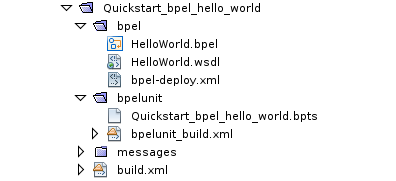

Now we have two files in the Quickstart_bpel_hello_world/bpelunit directory, the test suite and the build script we've just created. We want these files to be copied into the deploy directory for the test to be properly executed. On top of that we need to copy the WSDL file as well. To do this, open the "build.xml" file located in the test's root directory and at the end of the first "target" element add:
<echo>Deploy BPELUnit files for ${ant.project.name}</echo>
<copy todir="${deploy.dir}/${ant.project.name}">
<fileset dir="${test.dir}/bpelunit"/>
</copy>
<copy todir="${deploy.dir}/${ant.project.name}">
<fileset dir="${test.dir}/bpel">
<include name="*.wsdl" />
</fileset>
</copy>

This ensures that the WSDL file, the test suite and the BPELUnit build script will be copied into the deploy directory, which is RIFTSAW_SRC/integration-tests/target/tests/Quickstart_bpel_hello_world/.

One last thing remaining is modifying the "pom.xml" in integration-tests root directory. Open this file and in the project/build/plugins/plugin/executions element create a new "execution" node that will look like this:
<execution>
<id>test-riftsaw-bpelunit</id>
<phase>integration-test</phase>
<configuration>
<tasks>
<ant antfile="${basedir}/target/tests/Quickstart_bpel_hello_world/bpelunit_build.xml" />
</tasks>
</configuration>
<goals>
<goal>run</goal>
</goals>
</execution>

Running the automated tests

First we need to build Riftsaw itself, so from the RIFTSAW_SRC directory we run:
mvn clean install

Now in the final step we are going to execute the automated test by running this command from the "integration-tests" directory:
mvn -Dorg.jboss.as.home={path_to_jboss_as}
-Dbpelunit.home={path_to_bpelunit}
-Dorg.jboss.esb.home={path_to_jboss_esb}
-Dorg.jboss.as.config=default
-Ddatabase=hsql -Dws.stack=default -Dreplace.qa.jdbc=false clean install

In the log file you can find the report of the test that was made. It should look similar to this:
deploy:
[echo] Deploy Quickstart_bpel_hello_world
[copy] Copying 1 file to /opt/local/jboss/jboss-5.1.0.GA/server/default/deploy
[echo] Waiting 5 seconds to ensure proper deployment
[echo] Running BPEL Unit test for Quickstart_bpel_hello_world

create.reportsDir:
[mkdir] Created dir: /opt/local/jboss/riftsaw-2.0-CR1-src/integration-tests/target/bpelunit-reports
MEASURECOVERAGE=FALSE
ROOTPATH=/ws/
Test Run Completed. 1 run (0 failures, 0 errors)

undeploy:
[echo] Undeploy Quickstart_bpel_hello_world
[delete] Deleting: /opt/local/jboss/jboss-5.1.0.GA/server/default/deploy/Quickstart_bpel_hello_world-1.jar
[echo] Waiting 5 seconds to ensure proper undeployment

During the test the reports (in TXT and XML format) will be generated in the target/bpelunit-reports directory. The XML report contains extensive information that describe what message were sent to the BPEL engine, what was the expected and received outcome and how it affected the result of the test.

In the log you can see the build waits 5 seconds before and after the test run. This is to ensure the proper deployment. Of course in case there are more tests the deployment wouldn't be made for each single test separately, but for efficiency reasons a deployment of all processes would happen at one moment. In the presented example we use the approach just to make it as simple as possible.

Conclusion

We've just managed to successfully test the Quickstart Hello World process using a simple request-response test via BPELUnit. Transforming other samples to use this tool will be now even more easy, because now after we create the test suite (for example using the Eclipse wizard), we only need to copy the build script file with one small modification – changing the project name. The second piece of code also stays the same and as for the "pom.xml", we just need to add one line for each test.